FilmStar supports industry-standard database software
for managing coating designs and quality assurance.
 

Why you need the FilmStar Database

There are numerous benefits:

  • Coating facilities with hundreds of designs can sort and retrieve designs according to user-definable criteria.
  • Quality-control departments can organize tens of thousands of spectral measurements and select them according to type, customer, etc.
  • Management can evaluate trends in coating performance, identify problem areas, and perform what-if analyses based on previous coating performance. Calculations can be performed over selected data sets.
  • Security! Of course, your company's technicians are trustworthy, but can you really afford to assume that no one would ever improve results (search the document for Plummer) in order to ship product?

FilmStar provides the programming examples you need to utilize database technology in your coating facility. With database technology FilmStar becomes an important tool for managing optical coatings and meeting quality requirements.


Click for full size image

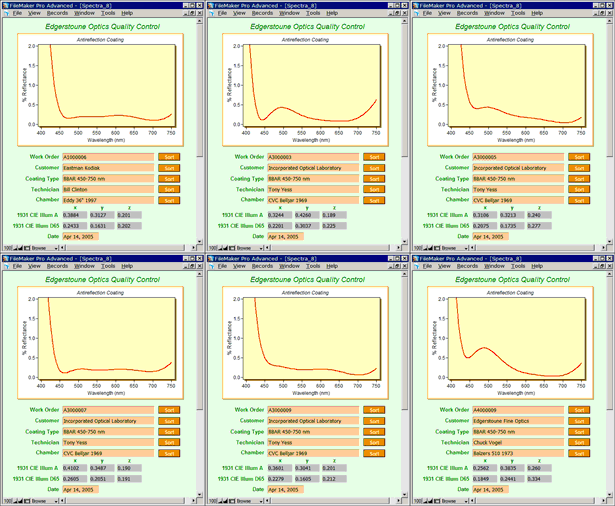
Spectra Database


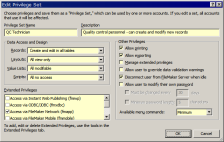
User Privilege Dialog

FileMaker Pro Database Solution

FileMaker Pro provides means to store spectra and/or designs in a secure database environment. With millions of users, FileMaker is an industry-standard workgroup solution which easily connects to your company's enterprise database.

FileMaker user-privileges (menus and access to functions) can be password protected. Data files (and optional pictures) can be stored directly in the database instead of in disk directories. Examples for storing spectra (illustrated here) and coating designs are based on the following FileMaker advances:

  • FilmStar BASIC can run FileMaker scripts via ActiveX. Once you understand the included examples, you'll be amazed how simple and powerful this really is. Measure a filter and the spectrum automatically appears in the database; it's that easy!
  • FileMaker Pro added the ability to customize menus according to user name and password. This helps to ensure that users and browsers do not alter results.
  • FileMaker Pro now includes container fields which can store data files as well as pictures.

Companies with multiple users should contact FileMaker to discuss their optimum configuration. One copy of FileMaker Pro Advanced is required in order to modify menus.

A sample standalone database not requiring FileMaker Pro can be downloaded (11 MB). While this does not include ActiveX automation, it gives you a good idea of how the FilmStar database works.


Click for full size image

MDB Database Solution

Click for full size image
FSPlot as Graphics Browser

MDB Database Solution

Another possibility is to update and edit Access-compatible .mdb files with FilmStar BASIC. While this requires programming effort beyond that required for our FileMaker solution, it offers ultimate flexibility for organizations committed to MS Access databases.

The relevant FilmStar BASIC code is surprisingly straightforward with relatively few new keywords. An example with documented code is provided with FilmStar. The example installs the MS database engine and does not actually require MS Access.

Finally, MS Access itself can be controlled from FilmStar BASIC.

Click here for our flyer 'Two Methods for Managing Spectral Data'

Copyright © 2008 FTG Software Associates
Last updated on January 22, 2008