FilmStar/Scantraq and Excel
|
Don't miss Excel
extends optical coating software capabilities
in Laser Focus World April 2014.
Click here to read the article;
click here
to download examples (Reference 1 in the article). |
|
Microsoft Excel is the world's most widely
utilized calculation/data analysis software. Optical coating
engineers all rely on Excel, but only FilmStar users get its maximum benefit!
In this page we present ways in which
Excel interfaces with FilmStar
(Scantraq). Examples 3-9 utilize Excel VBA.
Never heard of VBA? Start Excel and click Alt+F11. Surprised to see Microsoft Visual Basic (VBA) in the title bar? Once you discover the
power of Excel VBA,
you'll better appreciate how FilmStar's support far exceeds that
of other coating and spectrometer software. Compare an
ftgsoftware.com site search for 'Excel' with the same search on other
coating software sites.
|
Do you really want
25 separate spectral files to characterize uniformity
on a
large optic? A single file with 25 %T columns is clearly much
better!
Click here to learn
more about dealing with multiple spectra. |
|
|
 |
1. Data Exchange
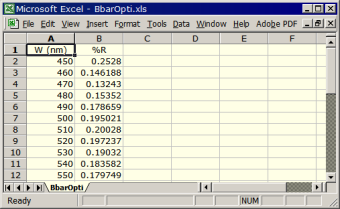
FilmStar spectral formats include .csv, .dx (JCAMP)
and .spc (Galactic GRAMS) and .xls/.xlsx (Excel). While .dx and .spc are
somewhat standard in spectroscopy, these formats are unfamiliar to
optical engineers and less than useful for data exchange.
FilmStar DESIGN/MEASURE (Scantraq) save directly in .xls and .xlsx format
(Excel not required). Applications include
custom spectra files,
n&k import/export, etc. The
Collector simplifies dealing with
multiple spectra. The built-in Excel Viewer
allows technicians to view and verify results without being able to
modify them. |
|
 |
2.
Copy/Paste Data
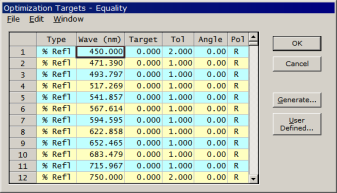
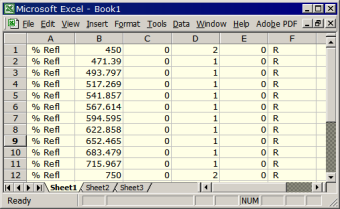
As illustrated by the DESIGN Optimization Targets dialog,
most FilmStar spreadsheet objects are Excel
copy-and-paste-compatible. Data can also be pasted or copied from the
FilmStar Workbook.
Applications include
- DESIGN..Import theoretical optimization targets
- DESIGN.. Import/export calculated spectra
- DESIGN..Rugated index profiles and thin film
designs
- INDEX..Import/export n,k tables, import
measured spectra for n,k calculations
- MONITOR..Import/export the monitor Worksheet
- MEASURE/Scantraq..Export measured spectra, useful for
combining multiple measurements
Applications like
Mathcad,
Origin and
SigmaPlot are also
Excel-compatible. This greatly extends the usefulness of FilmStar's
compatibility. |
|
|
|
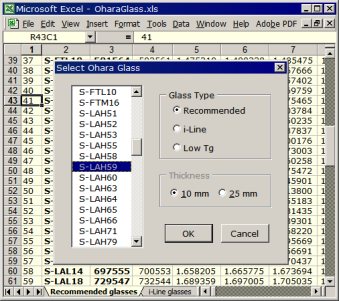
User-friendly glass selector |
3. Import Manufacturer's Data
Manufacturers typically supply data in Excel format. To make the workbooks easier to use we added an Export
sheet, a Select dialog and VBA.
Downloads in XLSM format: Ohara,
Schott,
Hoya,
CDGM
BASIC macros C:\Winfilm\Basic32\HoyaGlass.bas etc. directly create
INDEX n,k files (*.itw).
|
|
|
 |
4. Translate Designs
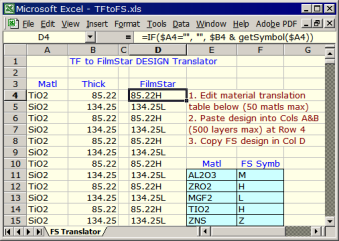
Designs from another program are pasted into Matl
and Thick columns. VBA function getSymbol helps
convert to FilmStar DESIGN format. Export from FilmStar would be very similar.
  Function getSymbol$(ByVal Matl$)
      Dim i%, t$
      For i = 1 To 50
          t$ = Ucase(Sh1.Cells(i + 10, 5))
          If t$ = "" Then
              getSymbol = "": Exit Function
          ElseIf UCase(Matl$)=t$ Then
              getSymbol = Sh1.Cells(i+10, 6)
              Exit Function
          End If
      Next i
  End Function
|
|
   |
5.
Calculate in Excel
There is often need to compute specialized and
possibly proprietary values from
theoretical or measured spectra. While this might be accomplished in
FilmStar BASIC and/or the
FilmStar Workbook, Excel offers further
possibilities.
One can always utilize Excel by manually pasting spectra, but
this approach may not be suitable in production. It's too easy to paste
data into the wrong columns and there are possible security issues.
Fortunately Excel is
COM
(component object model) compatible and can be utilized in the
background. Since FilmStar (Scantraq) is also COM compatible, it can send and
receive Excel commands and data.
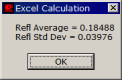
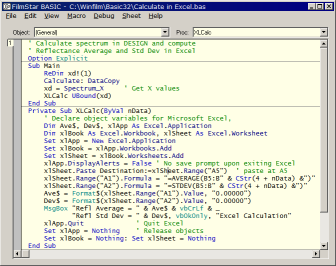
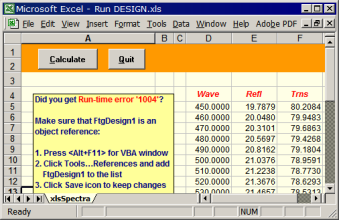
This is illustrated with the instructive 'Calculate in
Excel.bas' BASIC macro included with the
FilmStar Free Version. A user need only click a
button to run a hidden copy of Excel which computes requested
quantities.
This will not work with the pre-installed
'Click-to-Run' version of Office 2010.
Click here for further
information. More typically previously
created Excel workbooks are utilized. In
DESIGN macro
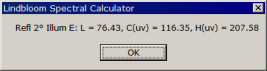
'SpecCalc5nm.bas' Bruce
Lindbloom's freely available Spectral Calculator (zipped)
(unzipped) computes LCH values.
DDE can also be used. |
|
 |
6.
Run FilmStar from Excel
In the above example,
FilmStar BASIC issues Excel VBA commands. In the
client-server
model, FilmStar is the client and Excel the server.
The opposite arrangement (Excel as client) is
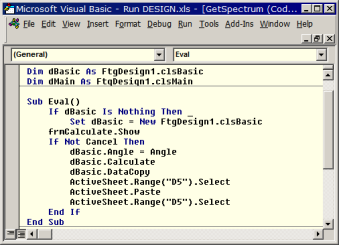
illustrated by an Excel workbook 'Run DESIGN.xls' also in the
FilmStar Free Version. Here
Excel runs DESIGN in the background. Since DESIGN is invisible, it might
appear that Excel has 'magically' gained the ability to perform thin
film calculations.
DESIGN BASIC subroutines (like .Calculate)
and
functions (like .Angle) act as if built into
Excel VBA. Skills learned with DESIGN are applicable to
MEASURE. Often the only difference in MEASURE or Scantraq is replacing
Calculate with Scan.
Optical engineers and spectroscopists who have so
far managed without Excel VBA take the risk of putting their
companies and their careers in jeopardy. The effort involved in
understanding and implementing VBA automation is
more than compensated by the advantages.
A very prominent manufacturer utilizes Excel Workbooks as process
databases. Stack Mode lets
them optimize optical characteristics and instantly modify Workbooks
accordingly. Their Excel-FilmStar solution is called ExcelStar. |
|
1. Sorting filters
2. R/T vs temperature
3. Absolute R/T Analyzer |
7.
Excel as Results Database
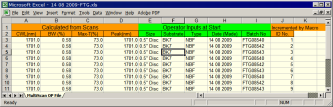
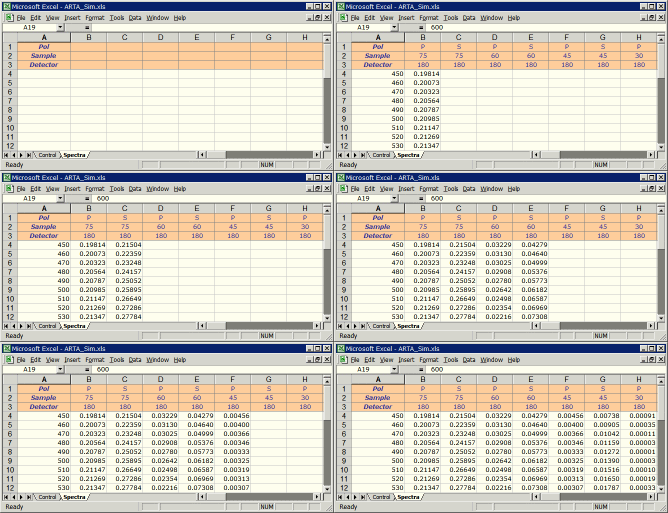
1. A UK coating company needed to sort
filters by center wavelength. Here FilmStar MEASURE BASIC communicates with a
PLC to move parts into the sample chamber. Filters are scanned, center
wavelengths computed, and results automatically inserted into Excel.
2.
A
Korean research facility needed to measure %R/%T over wide temperature
ranges. Excel was the obvious choice for saving multiple spectra; click here to learn
more.
3. A Dutch manufacturer of spectrophotometer accessories needed to
measure %R/%T over a wide range of incident and detector angles.
Excel was once again the obvious choice for saving the great number of
spectra. Click here to
learn more.
4. A coating engineer required reflectance vs. wavelength and layer
thickness lookup tables with ~6000 columns and ~1000 rows. Fortunately
Excel 2007 increased the maximum number of columns from 256 to 16,384.
Click here to learn more and
download relevant DESIGN BASIC code. |
|
 |
8.
Excel as Procedure Database
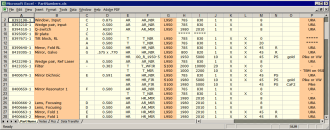
A NH manufacturer required a MEASURE
BASIC program to help technicians scan numerous optical parts. Our
solution uses
Excel as a database. Each row defines a procedure; photos and screen
images are included in gMsgBox
prompts. Example: 'Does the scan resemble the one shown here?'
|
|
|
 |
9.
Excel Color Grid
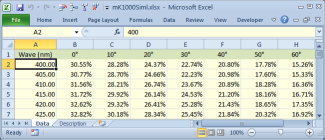
Since Excel 2007, cells
are no longer limited to 256 colors. This improvement allows us to
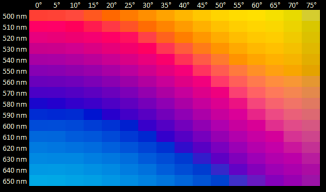
automatically generate RGB
color grids illustrating angle dependence, tooling changes, layer
variations, etc. Click here to download the Excel workbook shown at the left.
The diagram indicates how a graded thickness deep dish reflector can
minimize color shift as a function of angle. |
| Inspired by these examples? Think your
organization would benefit from more efficient use of Excel? Contact us
for a free consultation and an
online demonstration. If
your company lacks in-house Excel development resources, we'll be
pleased to discuss your requirements and provide a proposal. But really,
it's all much easier than you might think as shown in Dave Taddeo's
YouTube video. In addition
there are numerous
Excel VBA tutorials on the Internet. |
| |
|