FilmStar Free Version
|
 |
You use Excel and your
customers use Excel, so don't miss Excel
extends optical coating software capabilities.
Click here to read the article;
click here to access
freely available Excel workbook examples (Reference 1 in the article). |
The file you will download installs the Free Version of FilmStar
DESIGN. This includes powerful evaluation
and optimization facilities. The principal restriction is that the choice of indices is restricted
as shown below.
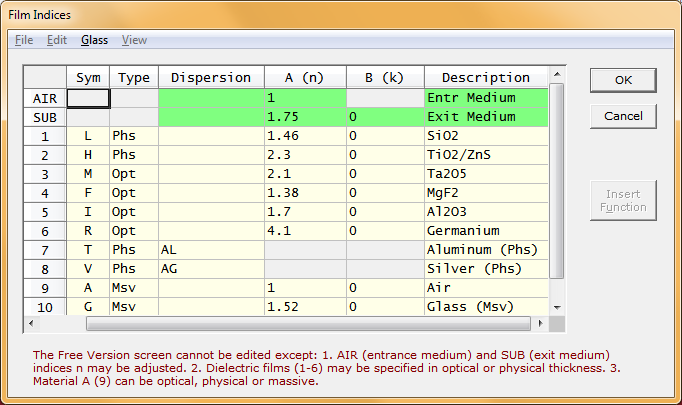
Since supplied
values are near actual ones and include dispersive Al and Ag, the Free
Version is suitable for what-if calculations and educational purposes.
Please
contact FTG Software if you have problems and questions.
The "Corrupt installation
detected" error indicates that you
do not have rights to install software (Windows 2000/XP/Vista/7)
If you are running Windows XP/Vista/7-10 and are
not the Administrator:
FilmStar has no 'beginning, middle and end'. There is no particular sequence that must
be followed, except that film index symbols (fixed in the Free Version) must be defined
before being used in a design.
Context sensitive help may be obtained at nearly any point in the program. Don't be
afraid to browse. Examine all the dialog boxes and repeatedly press <F1> for
explanations. To get up and running quickly try the following:
- In the File menu verify that FILM Archive Mode is checked.
- Click File...Open...FILM Archive (<Ctrl+F12>) and load FILM file BBAR.
- Click button Calculate and evaluate the spectrum.
- Click Optimize...Optimize (<Ctrl+O>) and refine the design for 10 iterations.
- Now calculate again and click Design...Review (<Ctrl+R>) to see the new design.
- Click Evaluate...Interactor (<Ctrl+Q>) to enable
the FilmStar Interactor!!!
If any of this doesn't work, please contact us for help. The on-line reference manual
is the same as the full version.
|