Scantraq can be linked to industry-standard database software.
 
There are numerous benefits:
  • Quality-control departments can organize tens of thousands of spectral measurements and select them according to type, customer, etc.
  • Management can evaluate trends, identify problem areas, and perform what-if analyses. Calculations can be performed over selected data sets.
  • Security is ensured via user-name and password protection, audit trails, etc. Unlike solutions provided by spectrophotometer manufacturers, a world-wide support network is available.

Scantraq provides the programming examples you need to utilize database technology in your facility. With database technology Scantraq becomes an important tool for managing meeting quality requirements.

As an alternative (or supplement) to the solutions given below, the optional Scantraq Database also supports NTFS file properties. Click here to learn more.

Click for full-size image
Spectra Database

FileMaker Pro Database Solution

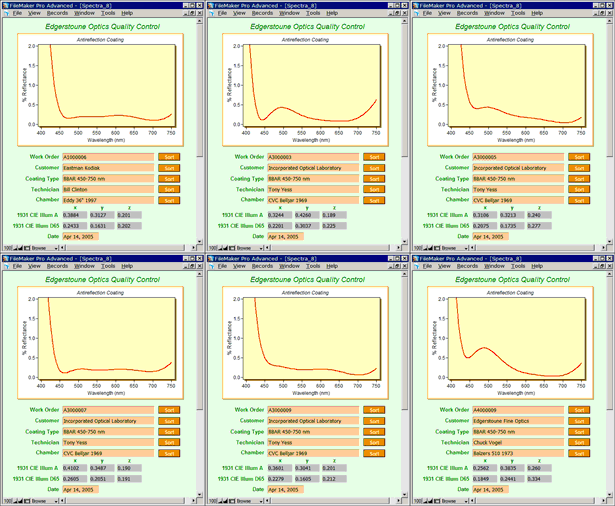
FileMaker Pro provides means to store spectra and/or scan methods in a secure database environment. With millions of users, FileMaker is an industry-standard database which can be part of a 21 CFR Part 11 solution. FileMaker Pro provides means to integrate with corporate (enterprise) databases such as Oracle, SQL Server, etc.

Most importantly, FileMaker menus and access to functions can be password protected. Data files (and optional pictures) can be stored directly in the database instead of in disk directories. Examples for storing spectra (illustrated here) are based on the following:

  • Scantraq BASIC can run FileMaker scripts via ActiveX. Once you understand the included examples, you'll be amazed how simple this really is.
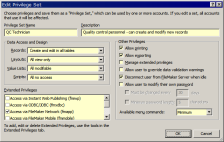
  • FileMaker Pro Version 8 added the ability to customize menu commands according to user name and password. (Previously a third party plug-in was required.) This feature is essential in ensuring that users and browsers do not alter results or modify database structures.
  • FileMaker now includes container fields which can store pictures as well as data files.


Click for full size image

MDB Database Solution

Click for full size image
SQPlot as Graphics Browser

MDB Database Solution

Another possibility is to update and edit Access-compatible .mdb files with Scantraq BASIC. While this requires programming effort beyond that required for our FileMaker solution, it offers ultimate flexibility for organizations committed to MS Access databases.

The relevant Scantraq BASIC code is surprisingly straightforward with relatively few new keywords. An example with documented code is provided with Scantraq. The example installs the MS database engine and does not actually require MS Access (recommended).

Finally, MS Access itself can be controlled from Scantraq BASIC.


Copyright © 2008 FTG Software Associates
Last updated on June 09, 2008